
Crawl-delay in robots.txt: Google, Bing, Syntax, and Examples
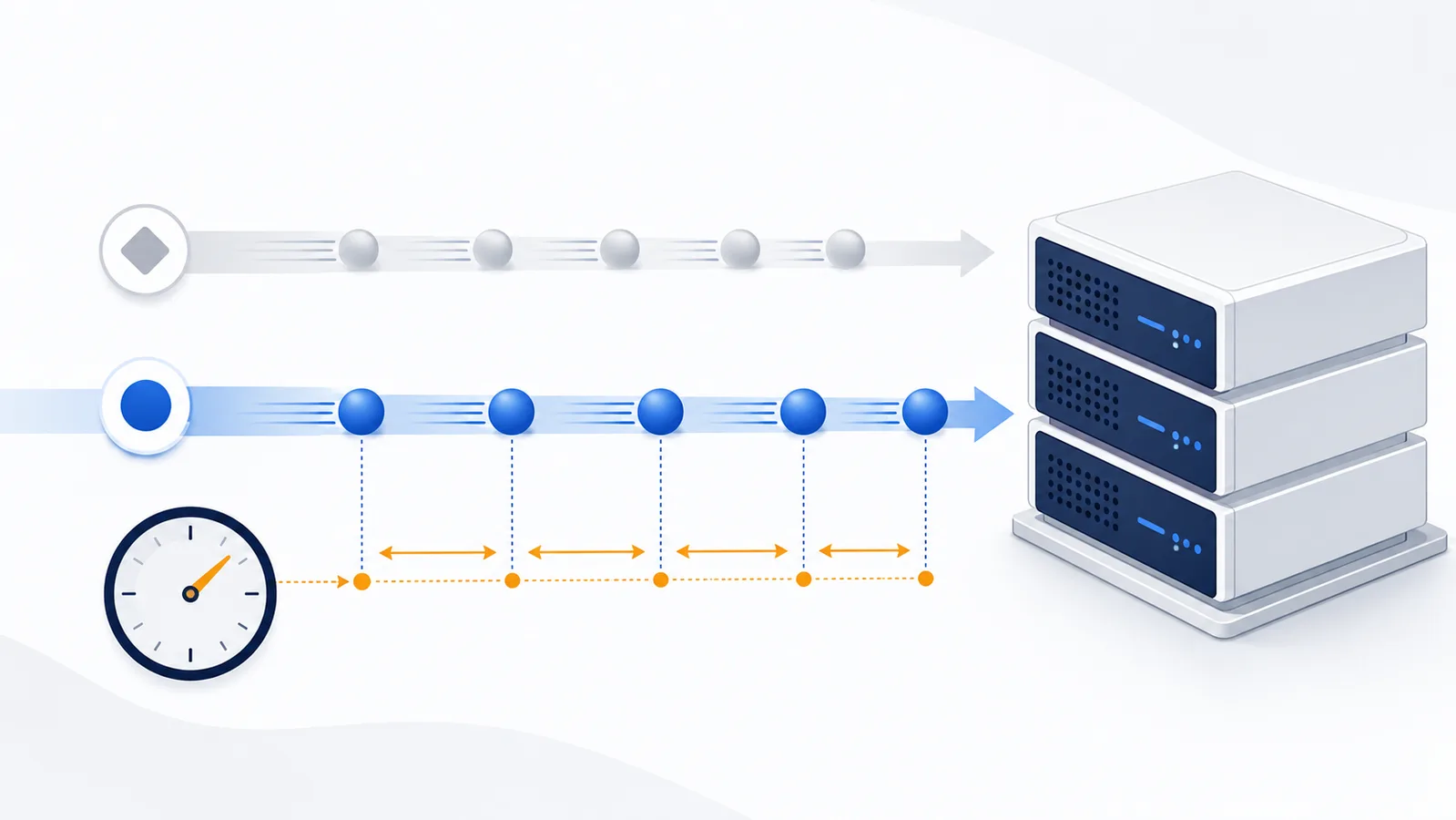
Crawl-delay is a non-standard robots.txt extension. Google documents it as unsupported, while Bingbot documents support with crawler-specific timing semantics. Use it only when logs show a real crawl-load problem and the crawler\u2019s current documentation confirms how the value is interpreted.
Copy-paste robots.txt example
User-agent: Bingbot
Allow: /
Crawl-delay: 5

User-agent: ClaudeBot
Disallow: /private/
Crawl-delay: 5
What Crawl-delay means
Crawl-delay is a non-standard robots.txt extension used by some crawlers to reduce request frequency. It is not part of the core Robots Exclusion Protocol standardized in RFC 9309, so support must be checked crawler by crawler.
User-agent: Bingbot
Crawl-delay: 5
The important point is that the number is not universally interpreted by every crawler. Do not copy a delay from a generic robots.txt example and assume Googlebot, Bingbot, GPTBot, or another agent will all react the same way.
Googlebot and Bingbot do not treat Crawl-delay the same way
| Crawler | Documented behavior | What to do |
|---|---|---|
| Googlebot | Google documents crawl-delay as an unsupported field in robots.txt. |
Do not rely on this directive to control Googlebot. Use Google's documented crawling and host-load guidance instead. |
| Bingbot | Bing documents support for Crawl-delay. Its current guidance describes small time windows in which Bingbot may crawl one URL. |
Use a Bingbot-specific group only when logs show that Bing crawling genuinely needs to be slowed. |
| Other crawlers | Support varies by provider and can change independently of the robots.txt standard. | Confirm the exact crawler's current primary documentation before publishing the directive. |
Primary references: Google's robots.txt interpretation and Bing's current Bingbot crawl guidance.
What a Bingbot value such as 5 means
Bing's current documentation describes Crawl-delay: 5 as allowing at most one Bingbot URL request in each five-second window. That is very different from “sleep exactly five seconds after every request,” and it is one reason you should not transfer Bing's interpretation to unrelated crawler names.
A higher value means less crawling. If discovery and freshness matter, an unnecessarily large delay can reduce the number of URLs a crawler can revisit. Treat Crawl-delay as a response to observed load, not as a default SEO setting.
Scope the delay to the crawler that actually causes the load
When only one documented crawler needs throttling, a specific group is safer than placing a delay under User-agent: *:
User-agent: Bingbot
Crawl-delay: 5

User-agent: *
Allow: /
A wildcard delay can be interpreted by several clients that happen to support the extension, while others ignore it completely. That makes the real effect harder to predict and can slow useful discovery without solving the original problem.
For Bing-specific policy, review the Bingbot crawler reference. For group-selection rules, see User-agent matching.
Do not use Crawl-delay as protection against abusive scraping
Robots.txt is public and voluntary. A scraper that ignores robots.txt can also ignore Crawl-delay. If requests are causing real operational problems, use controls that the server enforces: rate limiting, caching, a CDN or WAF, authentication for private areas, application-level quotas, or provider-specific traffic controls.
Before throttling a legitimate crawler, check whether the load comes from that crawler at all. A User-Agent string can be spoofed, so important decisions should be based on verified traffic where the provider publishes a verification method.
Check the problem before adding a delay
- Review server or CDN logs and identify the actual request source, paths, and rate.
- Confirm the crawler name and its current documentation.
- Fix slow application responses, missing caching, redirect loops, or oversized pages when they are the real bottleneck.
- Use the crawler's own crawl-control mechanism when one exists and is more precise than a robots.txt extension.
- If Crawl-delay is still appropriate, start with the smallest documented value that solves the load problem.
- Watch crawl volume and index freshness after publishing the change.
Verify the live file and the crawler-specific group
After publishing, open the exact /robots.txt URL and confirm that the new group is present on the correct host. Then use the robots.txt Checker to verify that your other Allow and Disallow rules still resolve as intended for Bingbot and for the ordinary search crawlers you did not mean to restrict.
The Checker can confirm rule selection and path access. It cannot prove that a third-party crawler implements the non-standard Crawl-delay extension, so use server logs to measure the real request rate after the change.
FAQ
Is Crawl-delay part of the official robots.txt standard?
No. RFC 9309 standardizes the core Robots Exclusion Protocol, while Crawl-delay is a non-standard extension. Support and interpretation must be checked for each crawler.
Does Googlebot support Crawl-delay?
No. Google documents crawl-delay as an unsupported robots.txt field. Do not rely on it to control Googlebot.
Does Bingbot support Crawl-delay?
Yes. Bing currently documents support for Crawl-delay and describes the value as a small time window in which Bingbot may crawl one URL.
What does Crawl-delay: 5 mean for Bingbot?
Bing's current guidance describes it as at most one Bingbot URL request in each five-second window. Do not assume another crawler interprets the same value identically.
Should Crawl-delay be placed under User-agent: *?
Usually only if you deliberately want every crawler that recognizes the extension to receive the same instruction. A crawler-specific group is safer when one documented bot is causing the load.
Does GPTBot support Crawl-delay?
Do not assume support from the directive name alone. Crawl-delay is non-standard, so use it for GPTBot only if OpenAI's current crawler documentation explicitly documents the behavior you intend to rely on.
Can Crawl-delay stop abusive scraping?
No. It is a voluntary instruction. Use enforceable server-side rate limiting, authentication, WAF or CDN controls, and application-level protections for abusive or unauthorized traffic.
 Bingbot robots.txt Rules for Bing Search
 AhrefsBot robots.txt Rules and Crawl Control
 SemrushBot robots.txt Rules for SEO Crawling
 What Is robots.txt? Scope, Rules and Limitations
 Common robots.txt Mistakes and How to Fix Them