
robots.txt HTTP Status Codes and Crawler Behavior
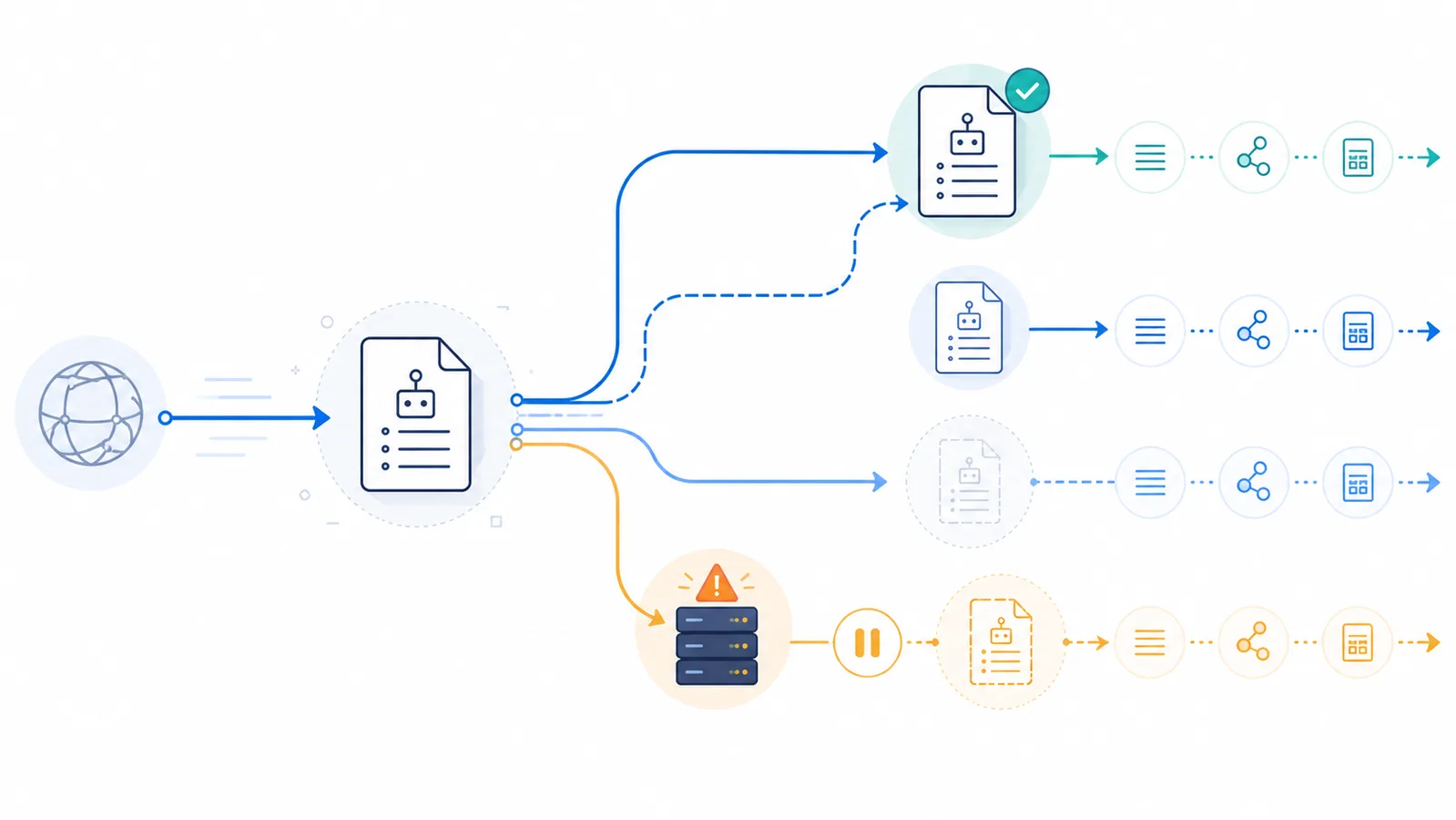
A successful 2xx response lets crawlers parse robots.txt. Redirects may be followed, ordinary 4xx responses often mean no usable robots.txt restrictions, while 5xx and network failures are treated as temporary retrieval problems. Exact behavior and cache timing vary by crawler, so return a stable 200 response for a valid file and never use 401 or 403 as a substitute for crawl rules.
Copy-paste robots.txt example
# Serve this content from /robots.txt with HTTP 200 and text/plain
User-agent: *
Allow: /

Sitemap: https://example.com/sitemap.xml
The response code changes the crawler policy
Crawlers must fetch /robots.txt before they can apply its rules. The HTTP result therefore matters as much as the file contents. A valid policy should normally be served as UTF-8 plain text with a stable 200 OK response.
2xx: process the returned file
A successful response tells the crawler that robots.txt was retrieved. It parses the valid groups and rules it understands. Returning HTML with a 200 status is still a mistake: some crawlers may extract parseable lines, but the result is unpredictable and difficult to maintain.
# Recommended response for /robots.txt
HTTP/1.1 200 OK
Content-Type: text/plain; charset=utf-8

User-agent: *
Allow: /
3xx: redirects are followed only so far
The Robots Exclusion Protocol recommends following at least five consecutive redirects. Google documents similar behavior and then treats an unresolved redirect chain like a missing file. Keep the final robots.txt URL simple, avoid loops, and remember that rules are applied to the original host for which the file was requested.
4xx: usually treated as unavailable
Under the standard, a 400–499 response means the robots.txt resource is unavailable and the crawler may access other resources. Google treats ordinary 4xx responses—except 429—as though no valid robots.txt file exists, so there are no crawl restrictions from that file.
- 404 or 410: usually means no robots.txt policy is available.
- 401 or 403: does not reliably block crawling; for Google it is treated like an absent file.
- 429: signals temporary rate limiting and is handled differently from ordinary client errors.
If you want to block a crawler, return 200 with a valid Disallow rule. Do not protect robots.txt itself behind authentication.
5xx and network failures: temporary uncertainty
The standard treats an unreachable robots.txt file, including server and network failures, conservatively and permits crawlers to use cached rules or temporarily assume broad restriction. Provider implementations add their own retry and cache policies.
Google documents a staged process: it initially pauses crawling while retrying, may use the last known good file for an extended period, and later changes behavior depending on whether the site and a cached copy remain available. A short outage can therefore preserve older rules rather than applying the file you intended to publish.
Do not confuse the status of /robots.txt with the status of a page
Response for /robots.txt | Googlebot handling | What to fix |
|---|---|---|
200 with valid UTF-8 rules | Parses applicable rules | Check the effective crawler group and path |
404 or 403 | Generally assumes no crawl restrictions | Publish the correct file; a 403 is not a robot-blocking policy |
429 or 5xx | Temporary crawl disruption, with retry/caching behavior | Investigate origin/CDN errors and rate limits |
| Redirect chain | Follows redirects up to a documented limit | Prefer a stable, directly retrievable text file |
A 404 from a normal article, by contrast, means that particular content is not available for indexing. The table above is specifically about fetching the robots.txt endpoint. Verify actual responses with a header request or your server logs, not by pasting HTTP codes into the draft rule simulator. See Google’s handling of robots.txt HTTP statuses.
Why status-code mistakes are dangerous
A hosting migration, CDN rule, maintenance page, redirect plugin, or security layer can silently change the robots.txt response. A 403 that looks restrictive to a human may actually remove crawl restrictions for some bots. A prolonged 5xx can pause crawling or keep stale rules in effect.
How to verify the response
- Request the exact root URL with a browser,
curl -I, or the robots.txt checker. - Confirm the final status, redirect chain, and content type.
- Open the body and verify that the expected rules are present.
- Repeat for important subdomains, because each host has its own file.
- After an outage, verify that the repaired file is stable and allow crawler caches to refresh.
For syntax after a successful fetch, review the robots.txt definition and wildcard matching.
FAQ
What status should robots.txt return?
Normally it should return 200 OK with a valid UTF-8 plain-text body. That gives crawlers an unambiguous policy to parse.
Does a 403 response block crawlers?
Not reliably. Google treats 403 like an unavailable robots.txt file and assumes no crawl restrictions. Return 200 with explicit Disallow rules instead.
What does a 404 robots.txt response mean?
It generally means no robots.txt file is available, so compliant crawlers may crawl without restrictions from that file.
How are 5xx errors handled?
They are temporary retrieval failures. Crawlers may pause, retry, or use a cached copy. Exact timing differs by provider, so restore a stable 200 response quickly.
Can robots.txt redirect to another URL?
Yes, crawlers may follow redirects, but only a limited chain is required. Avoid loops and excessive hops, and verify the final response and file contents.
 What Is robots.txt? Scope, Rules and Limitations
 robots.txt Checker
 Common robots.txt Mistakes and How to Fix Them
 How to Add a Sitemap to robots.txt and Verify It
 robots.txt Wildcards: * and $ Pattern Matching